
SyvirCom Std.1.01 - Download
You'll be able to download in few seconds.
Publisher Description
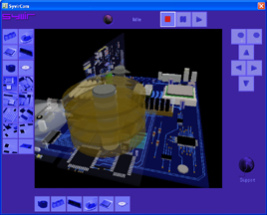
Watch your PC work! Real time virtual computer shows your PC working. SyvirCom monitors the main hardware on your computer. The virtual reality simulations change in unison with changes on the systems motherboard.
The Motherboard is based on a ATX spec. board. The board includes all the chips that would be found on a basic PC. Data flow is simulated between all the main chips. The main processes of the motherboard are simulated. These simulate data transfer between the CPU and North Bridge hub through to Memory cards .
SyvirCom monitors the computers processor, as load changes are detected, the CPU to north bridge bus data lines turn red.
Simulates memory bus, data lines turn red when CPU reads/writes to memory.
When you click with computers mouse button SyvirCom simulates what is going on inside your computer, with SyvirCom you can see the path the data travels along on the virtual motherboard.
The virtual motherboard displays the data path a key press takes as it journeys to the computers CPU.
Hard Disk Simulates data being read/write from a IDE hard drive. Data is read/write from the hard drive and simulated through the South bridge to the North bridge into the CPU. This is simulated in real time when the computers hard disk has a read/write cycle(XP Only). SyvirCom simulates the heads moving on the virtual hard drive, as data moves through the controller the data lines turn to red.
AGP Graphics Card Simulates the operation of the Graphics card including on board memory, this simulation can optionally be included with the Motherboard simulations when the CPU updates the screen memory.
The motherboard can be rotated and moved, you can zoom in onto the motherboard to see simulations close up. SyvirCom is highly configurable you can set up the program to just monitor hard disk activity or key presses.
About SyvirCom Std.
This program is available in English. It was last updated on 29 September, 2026. SyvirCom Std. is compatible with the following operating systems: Windows.
The company that develops SyvirCom Std. is Syvir Technologies. The latest version released by its developer is 1.01.
The download we have available for SyvirCom Std. has a file size of 6.3 MB. Just click the green Download button above to start the downloading process. The program is listed on our website since 2007-05-07 and was downloaded 0 times. We have already checked if the download link is safe, however for your own protection we recommend that you scan the downloaded software with your antivirus. Your antivirus may detect the SyvirCom Std. as malware if the download link is broken.
How to install SyvirCom Std. on your Windows device:
- Click on the Download button on our website. This will start the download from the website of the developer.
- Once the SyvirCom Std. is downloaded click on it to start the setup process (assuming you are on a desktop computer).
- When the installation is finished you should be able to see and run the program.
Program Details
System requirements
Download information
Pricing
Version History
version 1.00
posted on 2007-05-07
Disclaimer
External Download
We do not host SyvirCom Std. on our servers. We did not scan it for viruses, adware, spyware or other type of malware. This app is hosted by the software publisher and passed their terms and conditions to be listed there. We recommend caution when installing it.
The external download link for SyvirCom Std. is provided to you by apps112.com without any warranties, representations or guarantees of any kind, so access it at your own risk.
If you have questions regarding this particular app contact the publisher directly. For questions about the functionalities of apps112.com contact us.
